
Pooper Scooper Software: A Practical Buyer’s Guide
Pooper scooper software helps a pet waste removal business manage customers, recurring visits, routes, service records, and payments. The right choice depends on how your business schedules yards, handles missed visits, and bills customers, not on which platform has the longest feature list.
This buyer’s guide explains what to evaluate in pet waste removal software and gives you a repeatable demonstration checklist. It is published by ScooPilot, a software provider, so it is not an independent product ranking. Use the same checklist with every provider you consider.
Quick answer: what should pooper scooper software include?
Start with recurring scheduling, customer and property records, route planning, field visit updates, and invoicing. Then assess communication, reporting, and marketing tools against your actual workload. A solo operator and a multi-crew business may need different user allowances, but both need dependable visit and payment records.
- Customer management: keep addresses, dog details, gate instructions, service frequency, and communication history together.
- Route planning: organize recurring stops, assign technicians, and evaluate travel between yards.
- Field work: record completed or skipped visits and proof-of-service photos.
- Billing: connect services to invoices, payment status, and authorized automatic payments.
- Business reporting: distinguish revenue from profit after labor, driving, and other costs.
What makes pet waste removal software different from a spreadsheet?
A spreadsheet can track names and weekly prices, but a recurring service business also needs to track changes over time. A customer may pause service, change the number of dogs, move to a different route day, or miss a visit because a gate is locked. Software is useful when these changes reach the people scheduling, servicing, and billing the account without repeated manual entry.
A general field-service platform may support some of these workflows. An industry-specific product should make dog details, yard access, recurring service, and route density straightforward to manage. Ask each provider to demonstrate these tasks rather than assuming a category label guarantees them.
How to evaluate a pet waste removal CRM
A pet waste removal CRM should connect the customer relationship to the property being serviced. A contact name alone is not enough when a technician needs an address, gate instructions, dog information, and a record of the last visit.
- Create a sample customer with a service address, two dogs, a locked gate, and a weekly schedule.
- Check what the office can edit and what the assigned technician can see.
- Record a service pause and confirm how it affects future visits and billing.
- Find the customer’s messages, visit history, and outstanding invoices without searching separate tools.
- Ask which lead follow-up or marketing features are included in the plan you would actually buy.
Keep customer service management separate from marketing automation when comparing packages. A platform can include operational customer records while reserving marketing campaigns or sales pipelines for another tier. Confirm the distinction in writing before subscribing.
Pooper scooper route planning: density before distance
Route optimization and route density solve different problems. Optimization chooses an order for existing stops; density describes how close your customers are to one another. A well-ordered route can still be expensive if every yard is far from the next one.
Evaluate route planning software using a representative service day. Include nearby customers, one distant customer, realistic service durations, and your crew’s starting location. Compare drive time, total working time, and the effect of moving the distant stop to another day. Ask whether travel estimates use road distances and whether you can preserve a preferred stop order.
A worked example, not a promised result
Suppose a route has 20 stops. Reducing average travel between the 19 consecutive stops by two minutes would save 38 minutes, before accounting for travel to the first stop and home from the last. That does not automatically mean more revenue: another customer must fit geographically and within the working day.
Route profitability adds another check. A route collecting more revenue may still earn less after labor and driving costs. Ask which costs the reporting includes, how you enter them, and whether you can inspect individual stops as well as the route total.
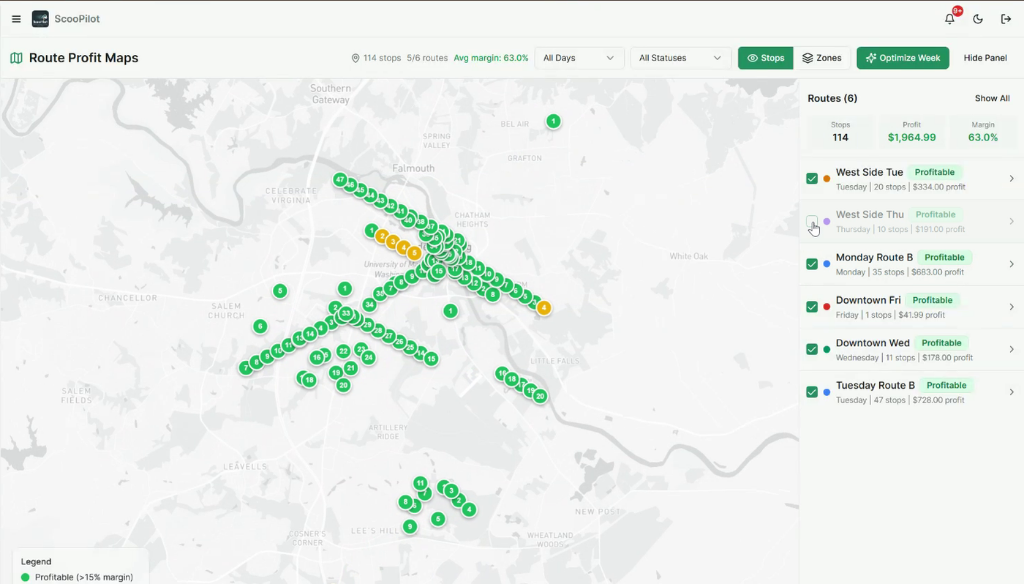
Explore ScooPilot’s pet waste route planning features and route profitability tools to see how routing and financial reporting fit together.
Recurring billing: test the exceptions, not just the invoice
Pet waste removal billing can be per visit, prepaid, or a fixed recurring amount. Decide which model your business uses, then ask the provider to demonstrate that exact model. Do not assume a recurring invoice automatically reflects a skipped or rescheduled visit.
- Create a customer with a normal service schedule and review the resulting invoice.
- Skip one visit because of a locked gate, then apply your policy for charges or credits.
- Pause service for a vacation and check the next invoice and schedule.
- Review a failed payment and the follow-up process.
- Confirm how customers authorize automatic payments and how payment status reaches the office.
Software supports a billing policy; it does not choose a fair policy for you or guarantee successful collection. Document how your business handles access problems, weather, holidays, and refunds before configuring automation. See ScooPilot’s recurring invoicing and payment tools for the product workflow.
Field technician tools to check on an actual phone
Technicians need a readable daily route, clear access instructions, and a quick way to record visit outcomes. During a demonstration, open a stop, find the dog and gate details, record a completed visit, and attach a photo. Then record a skipped visit and check what the office sees.
Ask whether the product runs in a mobile browser, a native app, or both. If offline work matters in your service area, confirm which actions work without a connection and how they synchronize afterward. Mobile access and offline capability are different requirements.
How to compare ScooPilot and other software options
Build a shortlist around your service model rather than a universal “best software” claim. ScooPilot, Sweep & Go, and Map the Day are options to investigate for pet waste operations; a broader field-service product such as Jobber may also warrant a demonstration. Verify current capabilities, prices, and plan restrictions directly with each provider.
- For a solo operator: prioritize straightforward scheduling, customer records, mobile access, and billing without unnecessary setup.
- For a growing crew: examine technician assignments, recurring route changes, office visibility, and the cost of adding users.
- For profitability decisions: inspect reporting inputs and whether route-level and customer-level costs can be understood.
- For mixed services: demonstrate each service type, quote, schedule, and invoice rather than assuming one workflow fits all work.
Use the ScooPilot software comparison as a starting checklist, alongside the Sweep & Go comparison and Jobber comparison. These are vendor-authored comparisons, not independent reviews; confirm details that affect your purchase.
What should your software budget include?
Compare the total cost at your current team size and at the next stage of growth. Include the base subscription, additional users, messaging allowances and overages, optional modules, payment processing, and any migration or setup charges. A low starting price does not establish the total cost for your business.
For ScooPilot, core operating tools and API access are available on every plan; marketing CRM is included on Solo and higher plans, not Start. Optional extras are separate. Check the current ScooPilot plans and included users for regional pricing and allowances rather than relying on an old comparison screenshot.
A practical trial and migration checklist
- Prepare sample records: include active, paused, and overdue accounts, plus clear service instructions.
- Run a representative route: schedule stops, assign a technician, complete a visit, and record an access problem.
- Reconcile the billing: compare expected charges with invoices and payment status.
- Check permissions and exports: confirm who can view customer details and how you can retrieve your data.
- Plan the switch: confirm what transfers, review imported records, and avoid sending duplicate customer messages or invoices.
Use fictional customer details for a public demonstration. Move real customer information only through an approved migration process, and do not assume stored payment credentials transfer between providers.
Frequently asked questions about pooper scooper software
Does a small pooper scooper business need a CRM?
A small business benefits from a CRM when customer instructions, recurring appointments, and billing changes become difficult to track consistently. Choose based on the administrative work it removes and the reliability of your records, not an arbitrary customer-count threshold.
Can route planning software guarantee more stops per day?
No. Route capacity depends on travel, yard conditions, dog count, access, service duration, and working hours. Software can help you compare routes, but any claim about additional stops needs to be tested against your own operation.
Is pet waste removal software the same as waste hauling software?
No. Pet waste removal typically involves recurring visits to yards or shared properties. Waste hauling may require container tracking, vehicle capacity, or disposal logistics. A broad search for “waste removal CRM” can return products intended for a different business model.
How should I decide after the trial?
Choose the platform that handles your normal route and your service exceptions clearly, gives staff the information they need, and fits your total budget. Keep notes from the same sample tasks across providers so the decision rests on demonstrated workflows.
See whether ScooPilot fits your operation
ScooPilot brings customer management, recurring scheduling, route planning, billing, and profitability reporting together for pet waste removal businesses. Start with the interactive ScooPilot demo, review the pet waste removal software features, and compare plans for your team. The software trial lasts 14 days and requires a card; optional voice plans are billed separately.
Ready to see it in action?
Explore how ScooPilot connects customer management, scheduling, routing, and billing for pet waste businesses.
Try the ScooPilot live demo